A beauty homepage needs to do more than announce a campaign. It should help visitors find a suitable product, understand what makes the brand relevant and decide what to investigate next.
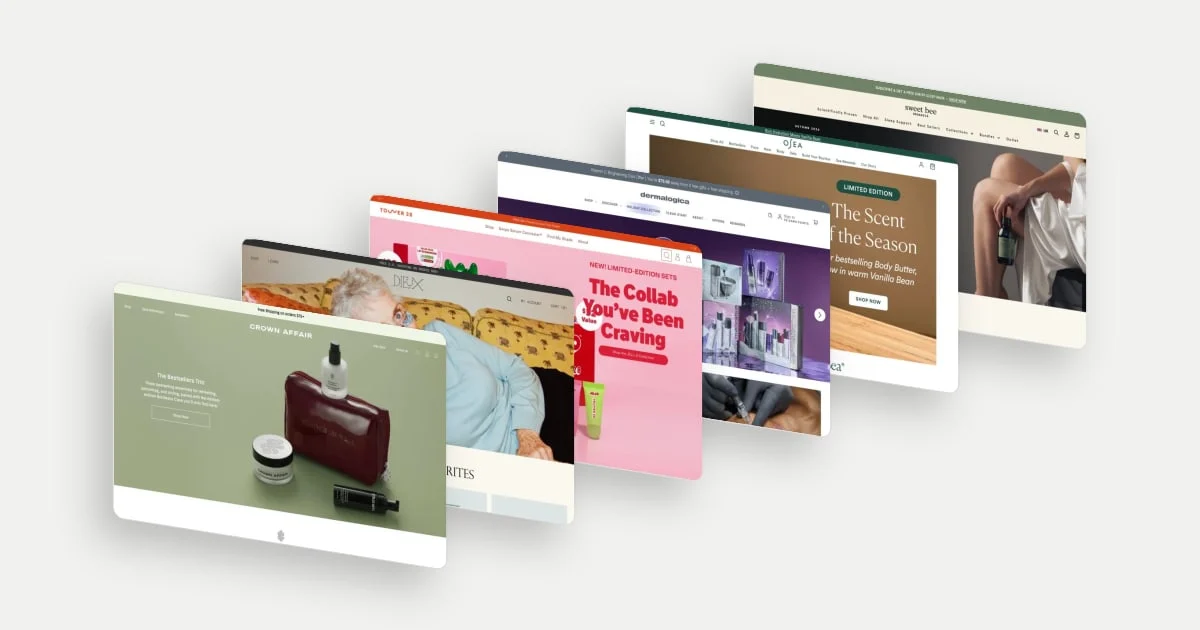
These 12 beauty and skincare homepage design examples include haircare and adjacent personal-care brands. We selected them for distinct approaches to shopping guidance, brand positioning and reassurance. “Best” means useful examples to study, not proven conversion leaders. The captures date from September and October 2026; the analysis concerns visible content and editorial interpretation, not verified product efficacy or live offers.
Look at the route through the page
The useful question is what happens after the campaign earns attention. Can a visitor browse by product type, recognise a concern, choose a routine or get help?
Baymard’s homepage research describes the homepage as both an entrance and a navigational fallback. It recommends making category navigation, search and curated product-finding paths clear. That gives us a useful lens for these examples without implying that any featured store has been tested by Baymard. Read the research.
12 beauty and skincare homepage examples
1. Crown Affair: connect a curated ritual to guided shopping
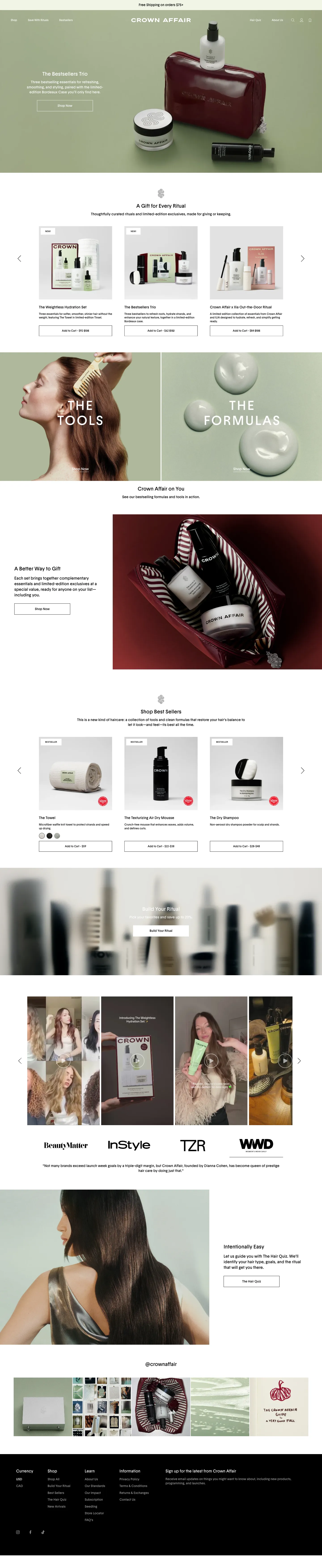
Crown Affair moves from a coordinated product set into gift selections, a Tools versus Formulas split and a route to building a ritual. A hair quiz appears later in the captured page. These are several ways of translating a brand idea into an actual purchase.
The distinction between tools and formulas helps someone browse by product type; the ritual language offers a way to think about products together. The quiz serves visitors who need help selecting. Together, these routes give visitors with different levels of certainty a way into the range.
View the full Crown Affair homepage capture, or explore Crown Affair in the library.
2. Dieux: move from personality to reasons to investigate
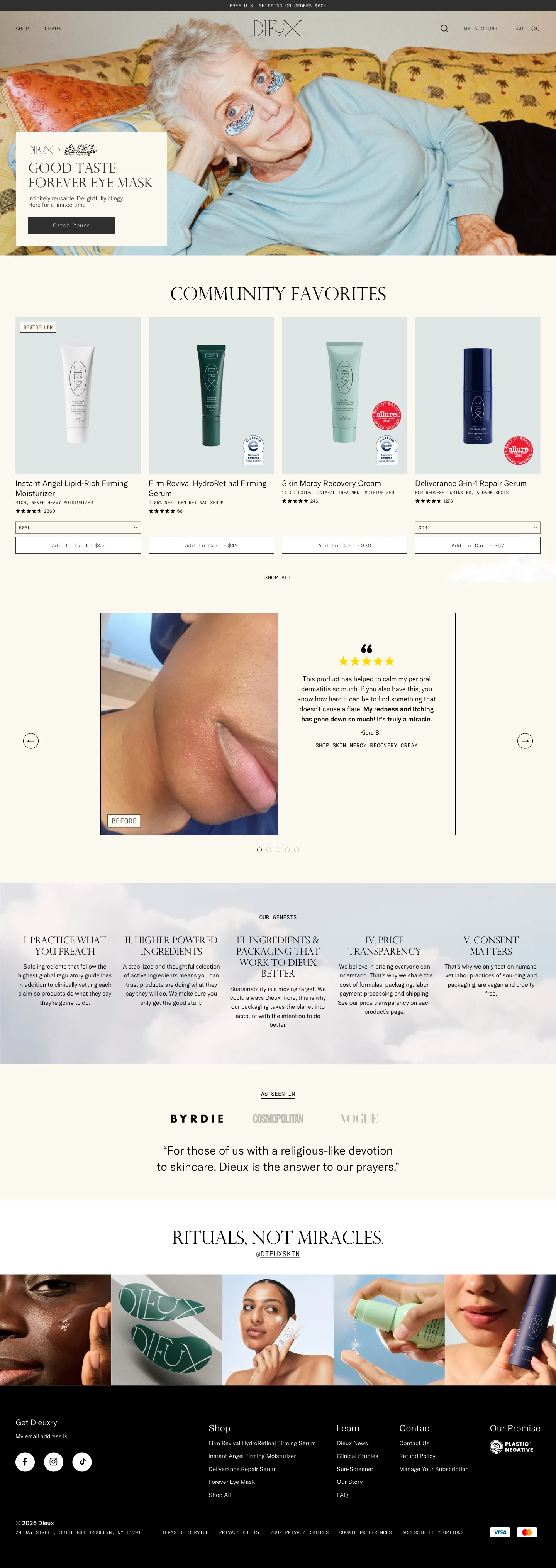
Dieux follows its expressive eye-mask campaign with Community Favorites product cards, a customer account paired with skin imagery, and a section explaining brand principles. Product selection, personal experience and the brand’s own reasoning appear as different layers.
That sequence gives a visitor more than a memorable first impression. They can move into the range or spend time understanding the proposition. Giving the customer account and the brand principles their own sections lets each do a distinct job: one shares a personal experience, the other explains the brand’s reasoning.
View the full Dieux homepage capture, or explore Dieux in the library.
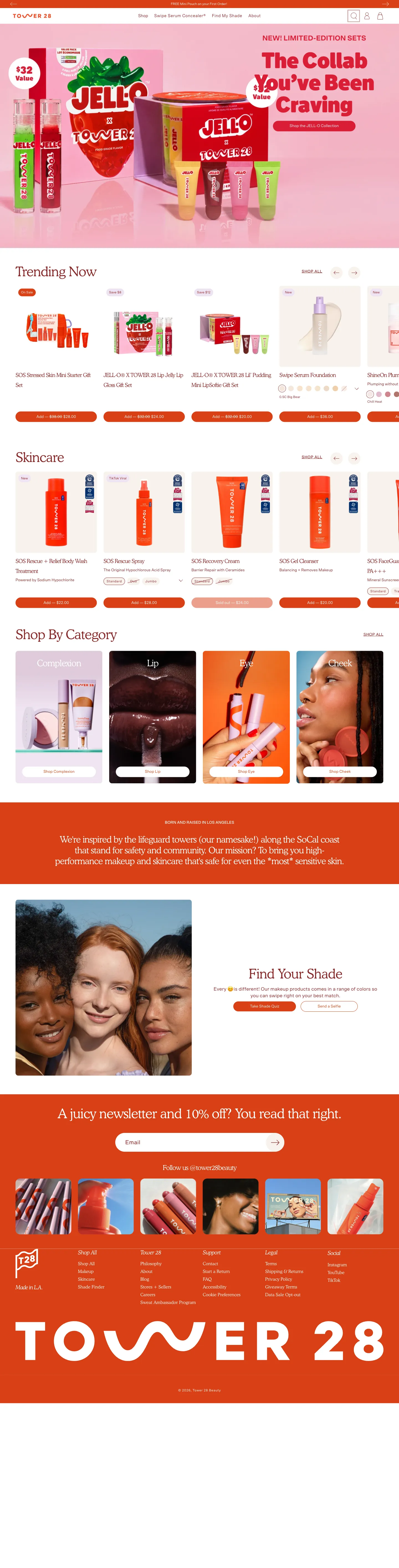
3. Tower 28: use the campaign as one entrance into the assortment
Tower 28’s collaboration campaign leads into Trending Now and Skincare rows, followed by visual category tiles for complexion, lip, eye and cheek. A later shade-help section offers another path for shoppers whose main question is matching colour.
This gives the homepage continuity beyond the launch. Someone attracted by the collaboration can browse it, while someone with another shopping task can recognise the rest of the range. The shade-help route addresses a more specific barrier than “shop all” can.
View the full Tower 28 homepage capture, or explore Tower 28 in the library.
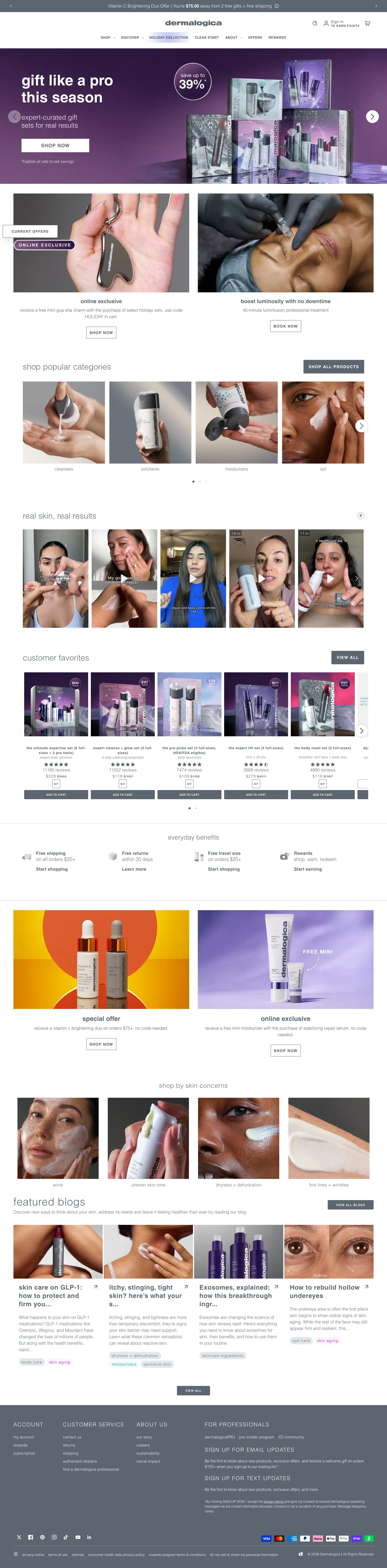
4. Dermalogica: support both product knowledge and concern-led browsing
Dermalogica includes a popular-category row for familiar product types and a later set of links organised around skin concerns. Between those routes are product cards, customer media, offers and shopping benefits.
A visitor who knows they need a cleanser can enter by category. Someone who can describe a concern but not a suitable product gets another vocabulary for beginning. That is the central design lesson: the homepage accommodates different levels of product knowledge. Placing the category row early and the concern links later gives each kind of visitor a recognisable place to start.
View the full Dermalogica homepage capture, or explore Dermalogica in the library.
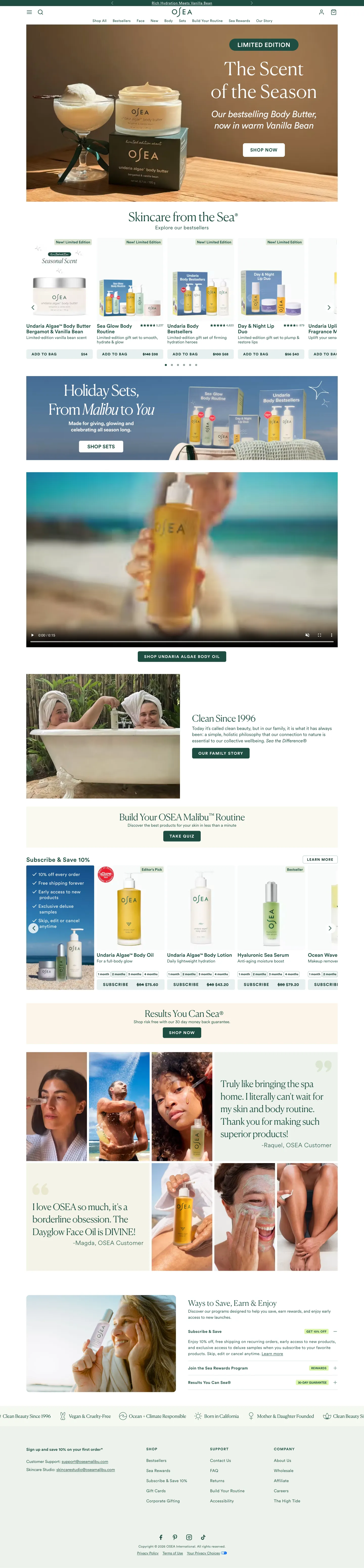
5. OSEA: separate discovery, routine-building and replenishment
OSEA moves from a seasonal body-care campaign into products and sets, a brand story, a routine quiz and a subscription section. The subscription block brings its benefits alongside products that can be bought repeatedly.
These modules address different stages of familiarity. A new visitor may need help choosing; a returning buyer may simply want replenishment; a gift shopper may want a set. Giving those routes different explanations makes the homepage more useful than repeating a purchase button after every image. Pairing the subscription block with its benefits tells a returning buyer what the recurring option offers.
View the full OSEA homepage capture, or explore OSEA in the library.
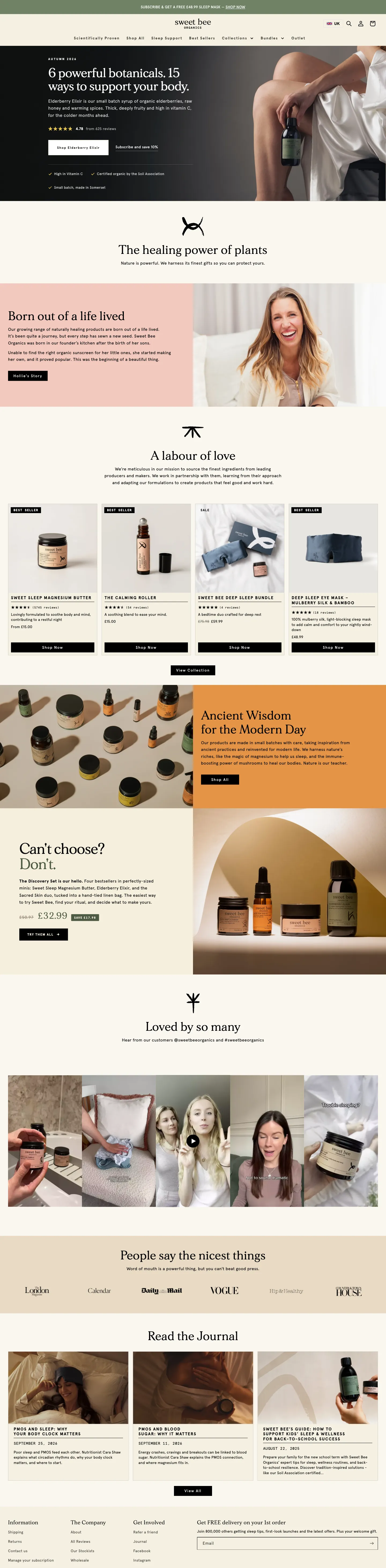
6. Sweet Bee Organics: offer a smaller commitment within a broad brand story
Sweet Bee’s homepage develops its botanical positioning through a founder story, product cards and a discovery set framed for people who cannot choose. Customer media and journal links appear further down. This is a wellness-adjacent example within the beauty and personal-care selection.
The discovery set is the most useful decision device: it gives an uncertain visitor a concrete way to explore several products. The founder story adds context and character, while customer media and journal links give curious visitors more to explore.
View the full Sweet Bee Organics homepage capture, or explore Sweet Bee Organics in the library.
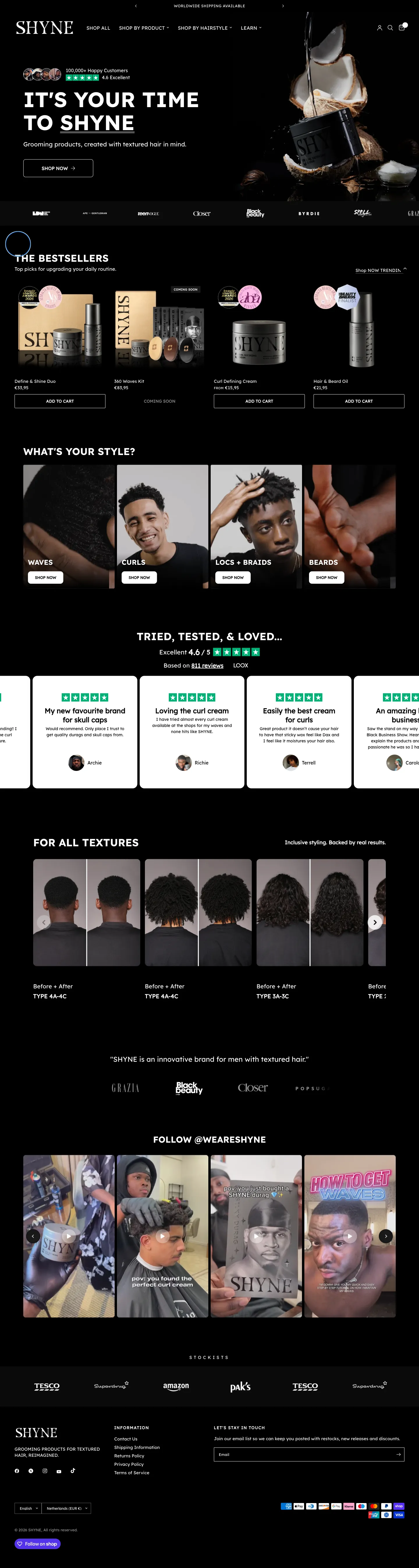
7. SHYNE: organise products around a recognisable styling task
SHYNE follows its textured-hair proposition with bestsellers and a “What’s your style?” section covering waves, curls, locs and braids, and beards. Reviews and texture-labelled before-and-after imagery extend that positioning down the page.
The category language helps someone begin with the style they recognise rather than deciphering product names first. It also makes the homepage’s initial promise more concrete. Labelling the before-and-after imagery by texture keeps the same vocabulary running down the page, so a visitor can find imagery relevant to their own hair.
View the full SHYNE homepage capture, or explore SHYNE in the library.
8. maude: make sensitive shopping feel ordinary and private
maude’s captured first screen presents intimacy products as part of a room and routine, while the announcement strip states that orders are boxed and billed discreetly. Its navigation includes shopping, subscription and editorial routes.
The privacy message addresses a practical question that product imagery cannot answer. In this category, uncertainty about packaging or billing may matter before someone is ready to browse. The restrained presentation supplies a brand context while keeping that operational reassurance in view. This example covers the captured entrance and navigation.
Explore maude in the library.
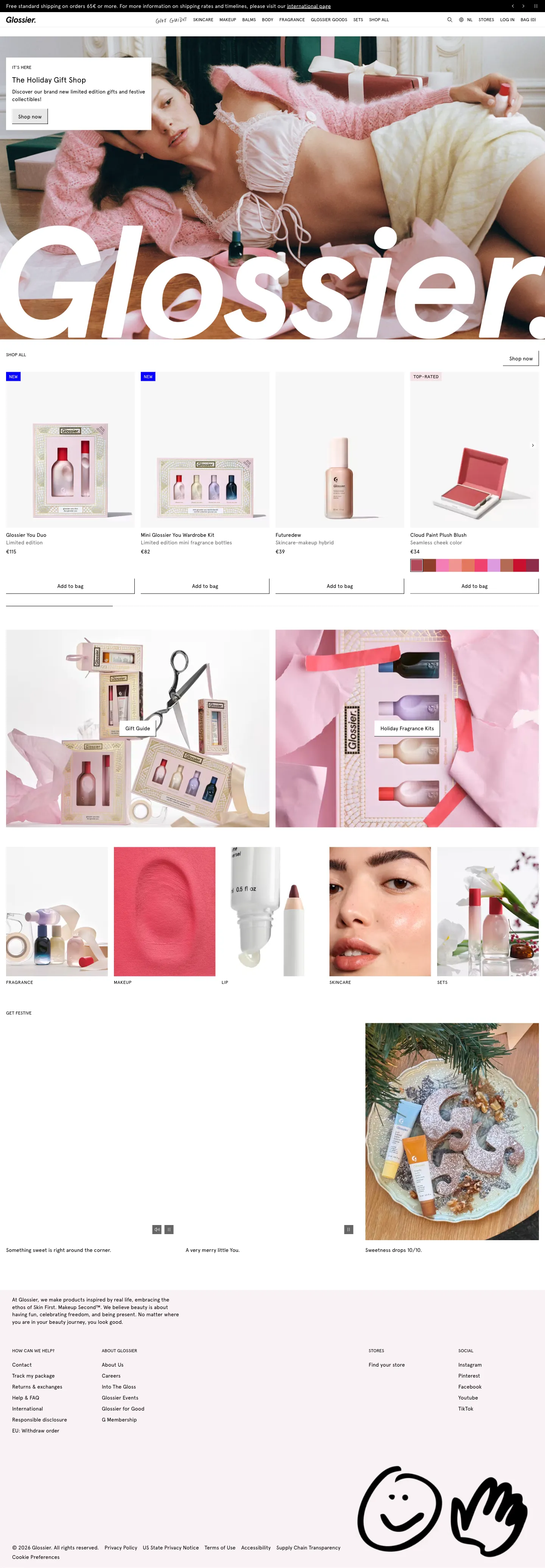
9. Glossier: balance campaign browsing with familiar categories
Below Glossier’s holiday campaign, product cards expose names, prices and purchase actions. Gift-focused imagery sits alongside a visual category row covering fragrance, makeup, lip, skincare and sets.
That creates two useful ways to navigate: explore the campaign or head toward a known category. A returning buyer does not have to adopt the seasonal story to continue shopping. The restraint of the product cards keeps the range visible, and showing names and prices beside the purchase action lets a shopper act without leaving the homepage.
View the full Glossier homepage capture, or explore Glossier in the library.
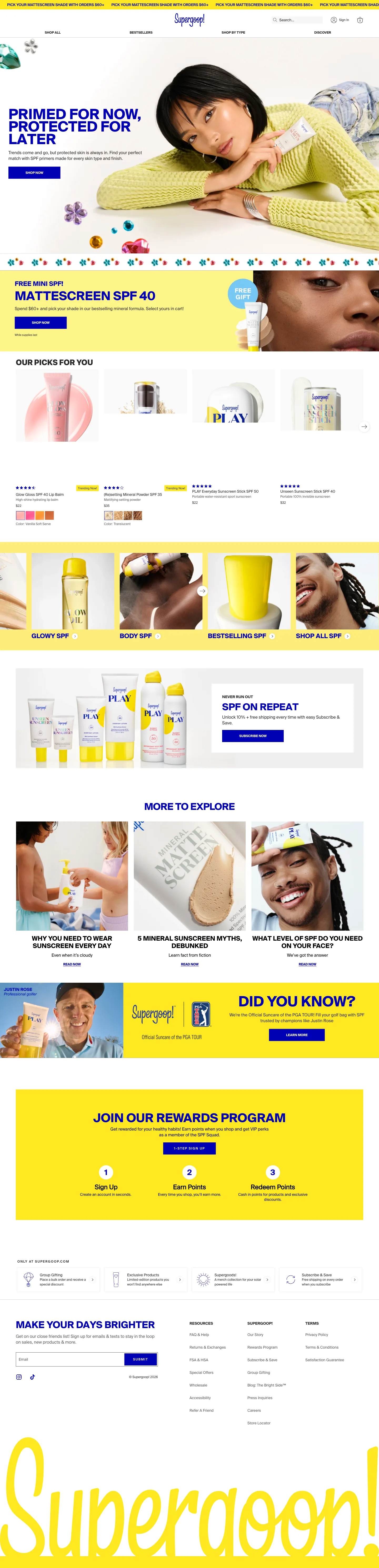
10. Supergoop: connect product discovery to category education
Supergoop’s homepage includes product picks and visual routes such as glowy and body SPF, then introduces replenishment and educational articles about sunscreen use. The organisation gives visitors a way to shop by the experience they want as well as investigate the category.
For a range with several formulas and finishes, that educational layer can address questions that a product tile cannot. The subscription section then serves a different task: repeating an established choice. Each section has a distinct job, from choosing a finish to learning how to use sunscreen to restocking.
View the full Supergoop homepage capture, or explore Supergoop in the library.
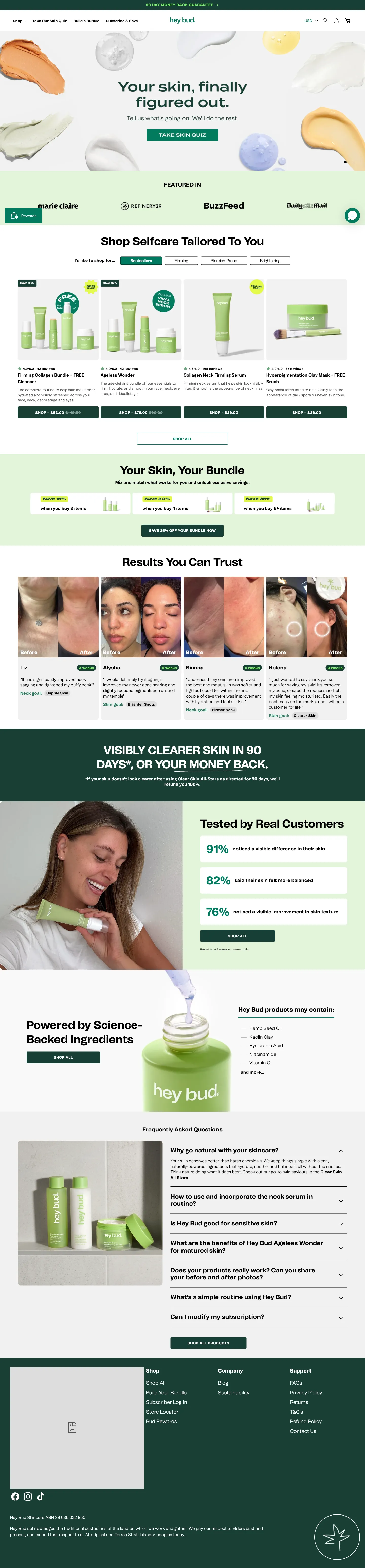
11. Hey Bud: let visitors enter by concern or ask for help
Hey Bud leads with a skin quiz, then offers a product area with concern-oriented tabs and a bundle proposition. Customer result cards, a conditional money-back message and FAQs appear further down.
The quiz is one response to selection uncertainty; browsing by concern is another. Keeping both matters because some visitors will want recommendations and others will prefer direct control. Further down, the customer result cards, money-back message and FAQs give a hesitant visitor reassurance and answers before they commit.
View the full Hey Bud homepage capture, or explore Hey Bud in the library.
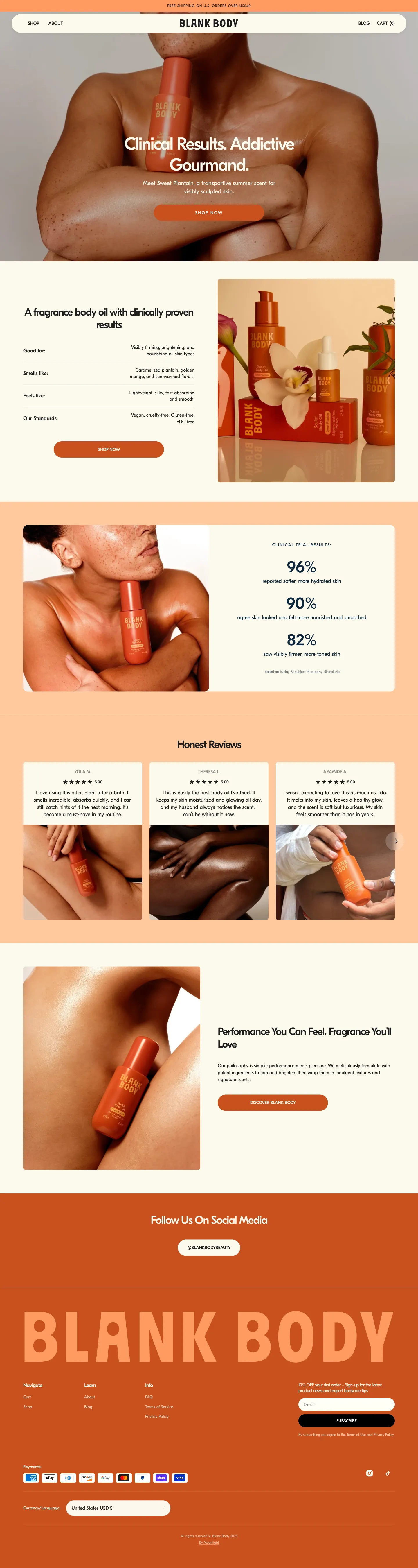
12. Blank Body: build the page around one product argument
Blank Body moves from an expressive body-oil campaign to a compact explanation organised around what it is good for, smells like and feels like. A results panel and review cards follow, before the page returns to the brand’s performance-and-fragrance proposition.
For a focused assortment, the homepage can develop one product argument instead of acting as a large department directory. Sensory information answers a different question from evidence about results, so both have a role. Placing the results panel after the sensory explanation means the numbers arrive once a visitor already understands what the product is like.
View the full Blank Body homepage capture, or explore Blank Body in the library.
What to borrow for your own homepage
- A clear first shopping route: someone ready to browse should not have to read the entire brand story first.
- A route for uncertainty: quizzes, concern categories and discovery sets solve different problems. Choose the one that fits the decision.
- Evidence with a defined role: press mentions, reviews, certifications and study results answer different questions. More badges do not make them interchangeable.
- Continuity beyond the campaign: preserve access to the range when a seasonal promotion occupies the first screen.
Map your homepage against three tasks: finding a known product, choosing within an unfamiliar category and understanding why to consider the brand. Then watch people attempt those tasks. If a section has no clear role, investigate whether it deserves its space before adding another module.
For a closer look at the first-screen decision, read 10 ecommerce hero section examples. For the next step in the purchase journey, explore 15 product page design examples.