A collection page has to help someone recognise the right product before they know its name. A grid of attractive photographs is only part of that job. The more useful question is: what information lets a shopper narrow this particular range?
For running shoes, it may be activity and cushioning. For sunscreen, finish and body area. For olive oil, the difference between a bottle and its refill. Those decisions should shape the page's categories, filters and product cards.
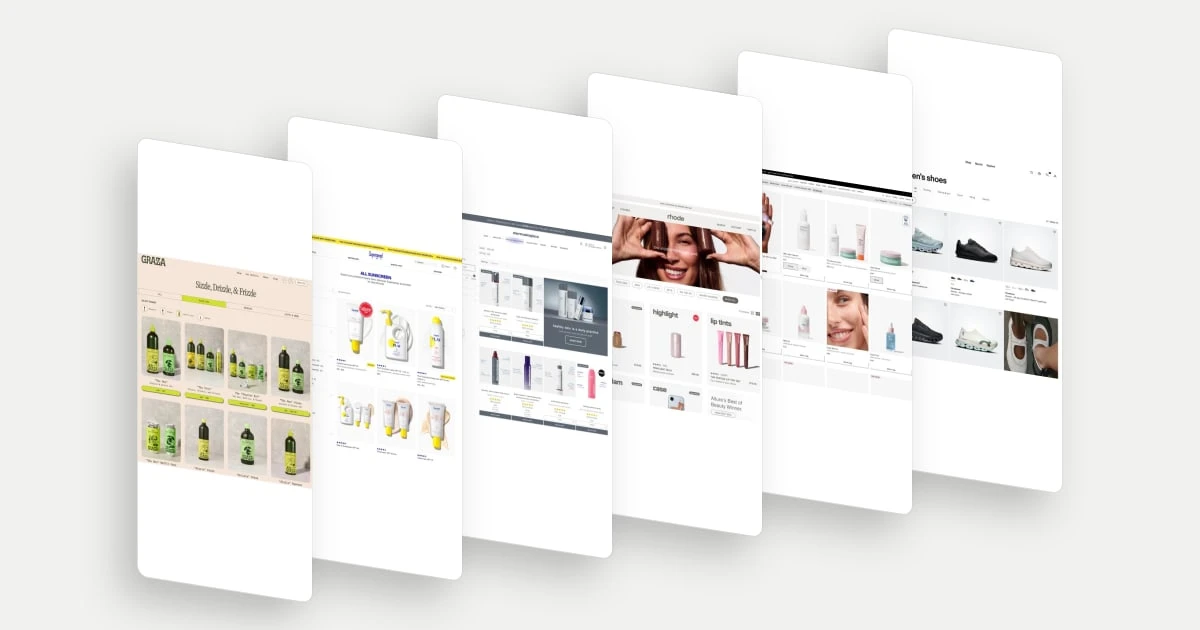
These ten examples were selected for distinct approaches to product finding, clear merchandising and useful product information. They are design references, not a ranking by sales performance. The dated desktop captures show the displayed state; filter behaviour, availability and mobile interactions are outside this review.
What to look for in a collection page
A collection page groups products around a category, use or campaign. It is also called a product listing page, or PLP. Its job is to make the next click more informed.
Baymard's product-listing research found that missing product attributes can force shoppers to open individual pages just to assess relevance. The implication for a design brief is practical: decide which comparisons belong in the grid before deciding how many columns it should have.
| Shopper question | Useful design response |
|---|---|
| Where should I start? | Categories named around a recognisable task |
| Which products suit me? | Relevant filters and concise product attributes |
| How do these differ? | Consistent images, sizes, prices and variant information |
| Can I buy this directly? | A purchase action that reflects any remaining choices |
10 collection page examples
1. Graza: separate the product from its container
Graza places format shortcuts above its olive oil grid: squeeze, glass, refill can and spray. The product images then show what each set contains, while the text distinguishes combinations such as the Duo and Starter Kit. That arrangement serves two different visits: choosing an oil for the first time and returning for a compatible refill. Packaging is a shopping decision here, not merely a cosmetic variant. The starter kit's subscription-labelled action also signals a different purchase proposition within the same range.
2. Supergoop: turn preferences into a way to narrow the range
Supergoop makes the sunscreen category more specific through filters for body part, preferences and finish. Terms such as matte, glowy and tinted describe the experience someone is trying to achieve, while product cards keep SPF and format visible. This bridges two vocabularies: the brand's product names and the shopper's desired result. It is especially useful in a range where several products meet the broad need for sun protection but differ in how they fit a routine.
Explore Supergoop in the library.
3. Dermalogica: connect technical names to everyday jobs
Dermalogica pairs names such as Daily Microfoliant with short benefit descriptions. Size selection, price and review counts sit beneath the product imagery. Someone who does not recognise a formulation name can still understand why they might open it. The photographed packaging and surrounding benefit labels also give the cards an educational role. This is useful for a specialist range: product discovery can begin with the desired job, rather than requiring the visitor to learn the whole brand vocabulary first.
Explore Dermalogica in the library.
4. Rhode: offer routes beyond product type
Rhode's collection shortcuts include product areas, sets, portable products and award winners. Those routes accommodate different shopping intentions: replacing a familiar item, choosing a coordinated purchase, or finding a starting point in the range. The cards reinforce this with concise descriptors under prominent product names. A lip-tint set is presented as a set of choices, while a mini product has its own role. The page gives a compact assortment multiple useful entry points without making visitors construct a detailed filter query.
5. Glossier: make sets legible beside individual products
Glossier displays individual skincare products alongside The Skincare Icons set, whose description names its components. A visitor can compare a single replenishment with a broader routine without first opening the set to find out what is inside. Size buttons on the cleanser card make another important difference visible at the browsing stage. The merchandising idea is to let the same grid support both a specific errand and exploration of complementary products.
Explore Glossier in the library.
6. On: put the activity ahead of the model name
On gives women's shoes activity routes such as running, training and gym, hiking and lifestyle. Beneath the model names, short descriptors identify intended uses and characteristics, including all-day comfort and waterproofing. Colour thumbnails reveal variation without turning every colour into a separate row of near-identical shoes. Together, these choices help someone navigate an unfamiliar model range through a familiar task: what they plan to do in the shoes.
7. Honeylove: show what a bundle price buys
Honeylove's dedicated bra-bundle collection photographs the products as sets. The shopper can see whether a card represents two bras or three before comparing the displayed prices and savings. Colour-combination swatches add another useful distinction without requiring a separate card for every possible set. This is merchandising around a larger purchase, but the page still explains that purchase in physical terms: the items included and the combinations available.
Explore Honeylove in the library.
8. OLIPOP: make a small collection feel deliberately curated
OLIPOP's limited-edition page presents a small lineup of distinct flavours with large can images and brief labels. The collection itself does much of the filtering: the visitor is already looking at temporary releases. Flavour names and recognisable packaging carry the remaining choice. This shows why a collection does not always need a dense interface. For a narrow campaign assortment, the useful work may be establishing the theme and making each option easy to identify.
Explore OLIPOP in the library.
9. Native: show the breadth behind a single product card
Native separates product types in the navigation and shows scent names plus option counts on individual cards. That makes one displayed deodorant or body wash a gateway into a wider choice rather than suggesting it is the only available scent. The holiday merchandising panel adds a campaign route within the catalogue. Routine purchasing and seasonal discovery can therefore coexist: the shopper can recognise a product type and also notice a new collection.
Explore Native in the library.
10. Tower 28: make the action fit the decision left to make
Tower 28's grid puts shade swatches beneath complexion products and size choices beneath its spray. A complexion set uses a Choose action while simpler items show Add. This is a useful distinction between shopping speed and selection support: some products can be understood from the card, while a set needs more input. Showing the relevant controls beside each item makes the assortment feel specific rather than forcing every product into the same generic card template.
Explore Tower 28 in the library.
Choose the information before the layout
Start with a handful of real shopping tasks: find a waterproof shoe, replace a cleanser, buy a refill, or choose a gift set. Ask people to use your collection page and explain which products they would open. Record the information they search for, the names they misunderstand and the comparisons they cannot make.
Carry the same comparison criteria into the next step. Our product comparison table examples show how to support a shortlist; the product page examples show how to help someone decide once they open an item.